
Open a store
Choose a store in the Homie catalogue, then open its regular website.
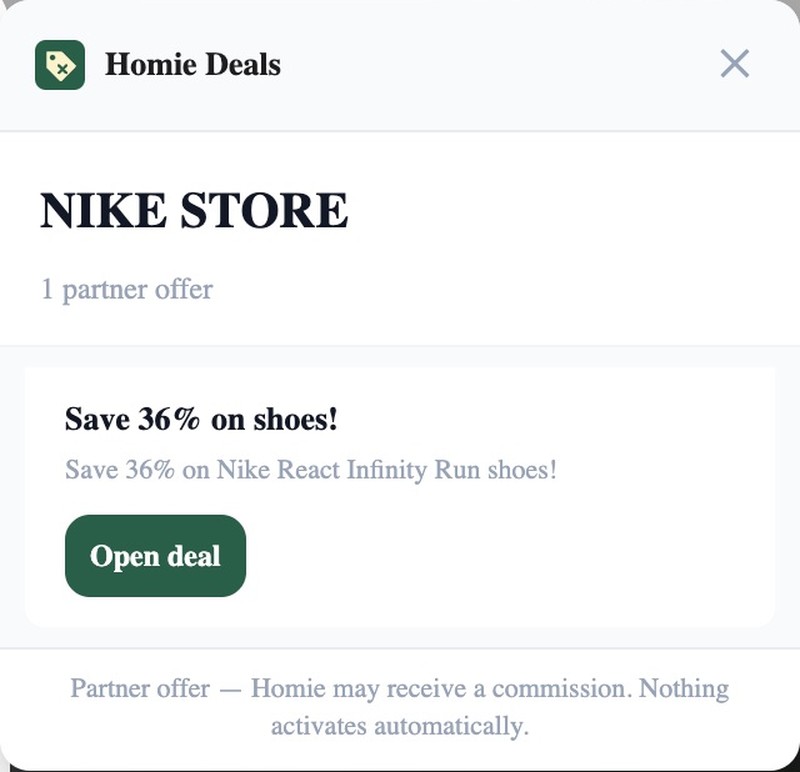
You visit a store from our catalogue and are about to place an order. Homie Deals shows a small panel with a promo code or offer and its terms in the corner of the page. You decide whether to use it.
Free. For Chrome on a computer. Partner offer — Homie may earn a commission. Nothing is activated automatically.
Install on a computer: open homievpn.com in Chrome
More than 1,200 stores
The catalogue updates automatically.
Free
Homie Deals costs nothing.
No registration
No Homie account needed.
Choose a store in the Homie catalogue, then open its regular website.
If a promo code or offer is available, Homie shows a panel with its terms. Nothing is activated automatically.

Check the terms. The code button copies the code and opens the offer; offers without a code have an open-offer button. If you do not want the offer, close the panel with the × button.
After installing, check your statistics settings — you can change them at any time.
Homie needs access to a store website to show its panel. When access covers all websites, Chrome warns that the extension can read and change data on them. The offer script runs only on catalogue store websites. Page URLs and browsing history are not transmitted. In Chrome's extension settings, you can restrict access to a click or selected websites. Panels will then be available only where you have granted access.
Homie does not require registration or credit cashback to its own wallet.
A partner link opens only after your click. Affiliate cookies are not set in advance.
At most two per store per day. Recognised cart, checkout, payment, login and account pages are excluded.
Page URLs and browsing history are not transmitted.
The service receives a persistent installation identifier to count activity.
You can turn off interface statistics in Settings. Offer statistics require explicit consent.
Read the full answer under “What data does the extension collect?” in the FAQ and in the privacy policy.

The catalogue includes stores in Russia and other countries: travel, films and series, software, food delivery and home goods. The store pages below show offers and their terms. Store guides are currently in Russian.
Homie VPN costs nothing and doesn't ask for an account. To help keep it that way, we also make Homie Deals, a separate shopping extension: when someone uses a deal from it, the store may pay us a commission. You don't need Deals to use the VPN. The VPN sometimes mentions Deals in its own window, but it never adds anything to the websites you visit.
Yes. Homie Deals costs nothing. We earn a commission from stores when you use an offer.
No. If an offer leads to a partner service, such as cashback, registration there follows that partner's rules.
Homie needs access to a store website to show its panel. The offer script runs only on catalogue store websites, and page URLs are not transmitted. You can restrict access in Chrome's settings; this also limits where panels can appear.
Page URLs and browsing history are not transmitted. The service receives a persistent installation identifier to count activity. Interface statistics cover installation and opening of the extension, feature use and settings. For new installations, they may be enabled immediately, except in the EU/EEA, the UK, Switzerland and when the time zone is unknown. You can check their status and turn them off in Settings. Offer statistics require explicit consent in every country. You can change your choice in Settings. Updates retain your previous choice. Read more in the privacy policy.
No. The extension does not replace page links or set affiliate cookies. A partner link opens only after your click.
At most twice per store per day. Closing a panel does not prevent another appearance that day within this limit.
Codes often have conditions: a minimum order value, selected products, first orders only or an expiry date. We do not manually verify every code, so check the terms shown beside it. Read more in the guide “How to check a promo code” (RU).
No. Homie shows promo codes and discounts; we do not have a wallet or credit cashback. Some partners offer cashback and require a partner account.
Close each panel with the × button. It can appear again within the limit of two per store per day. To uninstall, right-click the Homie icon and choose Remove from Chrome.
Install the extension now. When you open a catalogue store with an applicable offer, Homie can show a panel.
Need to open a website that will not load? We also make free Homie VPN for Chrome. It is a separate extension and is not required for Deals. About Homie VPN →