Free Chrome VPN for sites you choose
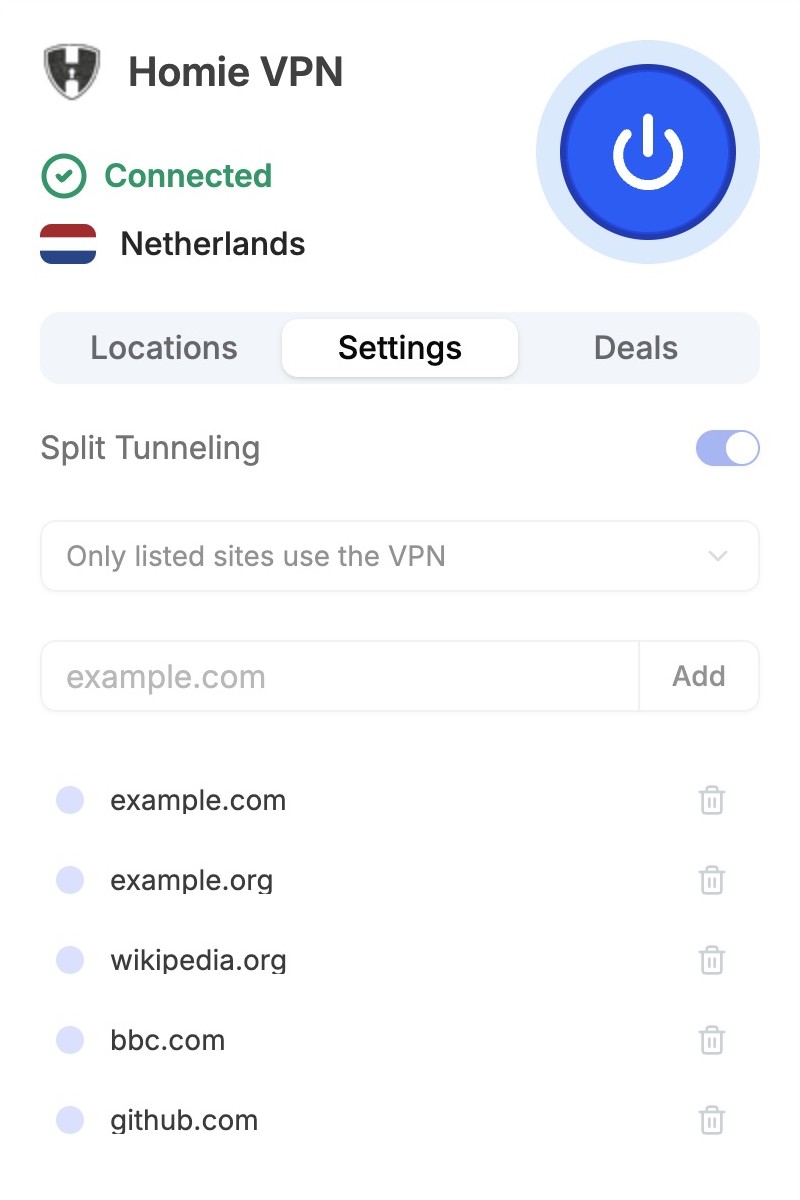
Homie VPN is a proxy extension for Chrome. Choose a country and turn on Split Tunneling to send only the sites you add through its servers. The rest of your browsing stays exactly as it was. Or route the whole browser if you prefer.
No account, no card. For Chrome on a computer.
Install on a computer: open homievpn.com in Chrome.
Free
No subscription or account.
10 countries
Choose a location in the extension.
Split Tunneling
Only the sites you add use the VPN
How it works
Install from the Chrome Web Store and pin Homie next to the address bar. The whole-browser mode is the default. To use selected sites, follow these steps.

Choose your sites
Before connecting, turn on Split Tunneling in Settings. Choose “Only listed sites use the VPN”, enter a domain and press Add.

Choose a country and connect
Open Locations and choose a country. Press the power button, then open your site. Switch Homie off in the same window when you finish.
What Homie doesn’t do
Other apps keep their normal connection.
No offers added to websites by the VPN.
Deals is a separate, optional extension.
Homie routes websites in your browser. Messengers, games and system updates use your normal connection.
Your data
No browsing-history logs, per our policy.
No visited-site or DNS-query logs, per our policy.
Technical data may be collected for troubleshooting.
Data and permissions in our privacy policy
Technical information may include the extension version, browser type and operating system.
More than 1,200 stores with Deals
Homie Deals is our separate shopping extension. It shows codes and sales on supported store websites. The catalogue includes stores in Russia and other countries.
Why we make Homie
Homie VPN costs nothing and doesn't ask for an account. To help keep it that way, we also make Homie Deals, a separate shopping extension: when someone uses a deal from it, the store may pay us a commission. You don't need Deals to use the VPN. The VPN sometimes mentions Deals in its own window, but it never adds anything to the websites you visit.
The Homie team. Write to the developer.
FAQ
Is it really free?
Yes. There's no trial, no card and no account.
Does it protect my whole computer?
No. Homie works only inside your browser. Other apps on your computer use your normal connection.
Which countries can I choose?
Open Locations in the extension to see the available countries.
Does it work on my phone?
No. Homie is an extension for browsers on a computer.
Do you keep logs?
Our privacy policy says we do not collect or store browsing-history logs, information about the websites you visit, or DNS queries.
A site still doesn't open with Homie on.
Try another country first. If that doesn't help, see what to do when a VPN isn't working.
Browser guides
Homie VPN is available for desktop Chrome. The guides below compare browser options and other providers.
Install Homie VPN in Chrome
Free, with no account or card. For Chrome on a computer.
On a phone? Open homievpn.com in Chrome on your computer.