
Iran restricts VPN usage to government-approved (licensed/authorized) VPNs, and “unpermitted” VPN use has been reported as banned, with enforcement risk depending on the situation. Multiple reports describe an escalation where VPN use is prohibited unless authorized, and the broader environment includes monitoring and uncertainty around enforcement.
Practical implications you should state clearly on the page:
- If you use a non-approved VPN, you may face legal consequences; the exact risk varies by enforcement, your profile, and context.
- A “working” VPN is not the same as a “legal” VPN; the safest legal posture is not guaranteed by technical features.
- This guide is informational and not legal advice; users should assess their personal risk tolerance.
Threat model: what a VPN does (and doesn’t) protect
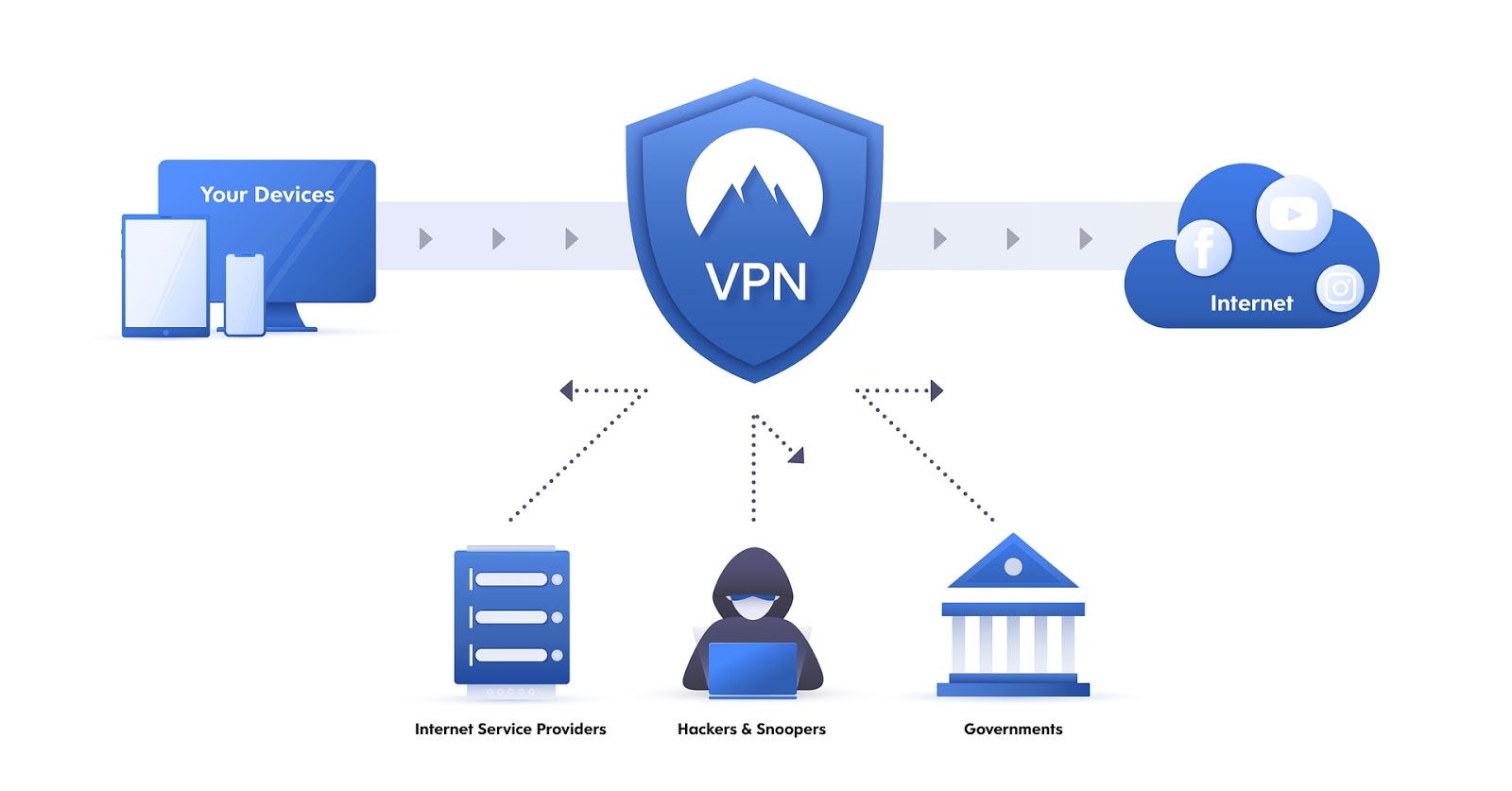
A VPN encrypts traffic between your device and the VPN server, which can help against local network surveillance and ISP-level filtering, but it doesn’t stop phishing, spyware, or someone accessing unlocked devices/accounts. In Iran, many blocks rely on deep packet inspection (DPI) and protocol fingerprinting, so VPNs without obfuscation are more likely to fail even if they are secure in theory.
Use a VPN as one layer, not the whole plan:
- VPN helps hide destinations from your ISP and can bypass blocks when the VPN connection itself isn’t detected.
- End-to-end encrypted apps still matter; a VPN can’t replace secure messaging or good account security.
- If authorities can compel device access, local device hygiene (screen lock, encryption, minimal data) becomes critical.
What “works in Iran”: key technical requirements
In restrictive networks, the deciding feature is typically obfuscation/stealth (making VPN traffic look like normal HTTPS or common web traffic). Two concrete examples you can cite:
- Proton VPN “Stealth” is described as WireGuard wrapped in TLS and sent over port 443, making traffic resemble standard HTTPS and harder for DPI to detect.
- Mullvad introduced QUIC obfuscation for WireGuard by encapsulating WireGuard traffic using QUIC and MASQUE (RFC 9298) to better blend into normal HTTP/3-style traffic patterns.
Minimum features to recommend (especially for Iran):
- Obfuscation/stealth protocol or obfuscated servers (the #1 “it connects vs it doesn’t” factor).
- Kill switch to reduce accidental IP exposure during drops.
- DNS leak protection / VPN-run DNS resolution so DNS queries don’t go to the ISP.
- Multi-protocol fallback (WireGuard + OpenVPN/IKEv2, plus stealth where available) for quick switching when a method gets blocked.
Top-5 VPN services for Iran (how to choose and use)
Below is a practical, Iran-focused view of each service: what to enable, what to avoid, and what to watch.
1) Proton VPN (best for Stealth + accessibility)
Why it’s strong for Iran: Proton’s Stealth mode is explicitly positioned to bypass censorship in places like Iran by disguising VPN traffic as ordinary HTTPS (WireGuard over TLS on port 443). Proton also states a strict no-logs policy, audited by independent experts (Securitum), and notes it’s based in Switzerland with strong privacy protections.
How to use it safely (rules):
- Use Stealth mode first when standard WireGuard/UDP fails.
- Turn on kill switch (especially on mobile) to reduce exposure when networks fluctuate.
- If the website/app store is blocked, plan for alternate install routes; reporting notes Proton helped users via sideloading APK distribution through support exchanges.
Data safety notes:
- Proton states it does not store activity logs/metadata and routes DNS queries inside the encrypted tunnel to be resolved on its servers.
2) Mullvad (best for privacy-minimal accounts + modern obfuscation)
Why it’s strong for Iran: Mullvad emphasizes minimal data retention via numbered accounts and a “no logging of user activity” policy. For censorship evasion, Mullvad added QUIC obfuscation for WireGuard on desktop platforms (2026.9), using QUIC and MASQUE to make VPN traffic harder to distinguish from ordinary web activity.
How to use it safely (rules):
- If connections fail, enable QUIC obfuscation in the desktop app settings (WireGuard obfuscation → QUIC) as described in reporting on the feature.
- Keep expectations realistic: obfuscation methods can affect performance and may not behave the same on every network.
Data safety notes:
- Mullvad’s policy explains what it does not log (no traffic, no DNS requests, no IP addresses, no connection timestamps) and also describes what account/payment data may be processed depending on payment method.
3) NordVPN (popular “works-in-Iran” choice; prioritize obfuscation)
Why it’s used for Iran: mainstream “best VPN for Iran” lists often recommend providers like NordVPN and emphasize using obfuscation when VPN protocols get blocked. In Iran, those anti-DPI features matter as much as speed.
How to use it safely (rules):
- Prefer obfuscated servers/modes when standard connections fail.
- Keep multiple nearby regions saved (e.g., Turkey/UAE/Armenia equivalents) so you can rotate quickly during blocking events (choose based on latency and stability).
Data safety notes:
- Treat “no logs” as a policy claim and prioritize providers with clear documentation and audits where possible; don’t rely on marketing alone.
4) ExpressVPN (good for simplicity; still follow Iran threat model)
Why it’s used for Iran: consumer guides frequently list ExpressVPN among options that continue working in restrictive environments, typically due to built-in obfuscation and stable apps. For Iran, ease of switching networks and keeping kill switch enabled is often more important than advanced tuning.
How to use it safely (rules):
- Enable the kill switch / network lock equivalent to reduce accidental leaks during disconnects.
- If one protocol fails, switch protocols/servers rather than repeatedly reconnecting to the same endpoint.
Data safety notes:
- Remember that a VPN does not secure your accounts; use strong authentication and minimize sensitive data stored locally.
5) Surfshark (value + “restricted network” style features)
Why it’s used for Iran: guides often recommend Surfshark for restrictive regions, typically highlighting obfuscation/camouflage-style modes and usability. For many users, the practical advantage is quick setup across multiple devices, which matters when blocks shift.
How to use it safely (rules):
- Use any “restricted network” or camouflage/obfuscation options first when you suspect DPI blocking.
- Don’t mix high-risk activity with everyday browsing profiles; separate devices/accounts if possible.
Data safety notes:
- Treat multi-device convenience as a usability feature, not a privacy guarantee; your operational security habits still matter most.
Iran-focused VPN comparison
| VPN | Anti-censorship / obfuscation | Privacy & logs stance | Best for in Iran | Main limitations / notes |
|---|---|---|---|---|
| Proton VPN | Stealth protocol: WireGuard tunneled over TLS (commonly discussed as HTTPS-like, typically via port 443 usage) to bypass censorship/DPI. | Proton states a strict no-logs policy and says it’s audit-verified; also states DNS queries are routed inside the VPN tunnel and resolved on its servers. | People who need a “connects more often” option under DPI blocking + straightforward apps. | Stealth/obfuscation can reduce speed vs normal WireGuard; availability may vary by platform and network conditions. |
| Mullvad | QUIC obfuscation for WireGuard (desktop app v2025.9+), based on MASQUE (RFC 9298), makes traffic appear like normal web/HTTP3-style traffic. | Mullvad publishes a no-logging policy (no activity logs, no DNS request logs) and details what it does/doesn’t store. | Privacy-focused users and those needing modern censorship-evasion on desktop. | QUIC obfuscation initially desktop-focused; mobile support may lag depending on release cycle. |
| NordVPN | Offers “obfuscated servers” (commonly used to bypass VPN-blocking firewalls). | Generally marketed as no-logs (verify current policy/audits on vendor site before publishing). | A mainstream option often recommended in “VPN for Iran” lists; useful when standard VPN endpoints get blocked. | Obfuscation is typically not enabled by default and must be turned on; behavior can vary by app/platform. |
| ExpressVPN | Often cited as working in restrictive networks due to built-in obfuscation behavior (typically automatic depending on configuration). | Marketed as privacy-focused; confirm current logging/jurisdiction details from official docs before final copy. | Non-technical users who want simple setup and stable apps. | Less “tunable” for advanced users; effectiveness can change during blocking waves. |
| Surfshark | Commonly recommended for restrictive regions; guides highlight obfuscation/camouflage-style behavior for blocked networks. | Marketed as no-logs; confirm exact data practices from official documentation before final copy. | Budget-friendly multi-device use + basic anti-blocking features. | As with others, connectivity can be inconsistent in Iran during crackdown periods; keep fallbacks. |
Rules for safe use (practical checklist)
Follow these “rules of use” in Iran to reduce both outages and accidental exposure.
- Always enable kill switch before you log into sensitive services.
- Prefer stealth/obfuscation modes when available; censorship systems often target VPN fingerprints rather than just IP addresses.
- Avoid “free unknown VPNs” and random proxy apps; your VPN provider can technically observe your traffic, so reputation and clear policies matter.
- Keep two providers ready (or at least two connection methods) because blocks can change quickly and a single vendor can go down.
- Update apps frequently; censorship circumvention features (like QUIC obfuscation) arrive through client updates.
User data safety and privacy (what to disclose on your site)
A VPN provider can be a sensitive trust point, so your article should tell users what data may exist and where it can leak.
- Logging: Proton states it keeps no logs of online activity/connection metadata and that this was verified by an independent audit. Mullvad states it stores no activity logs and details what it does not log (traffic, DNS, IP addresses, timestamps).
- DNS: Proton states DNS queries are routed through the VPN tunnel and resolved on its servers, which reduces ISP-level DNS monitoring.
- Payments and identity: Mullvad explains how different payment methods can change what personal data is processed (e.g., card/PayPal involves third parties), while its numbered account system avoids requiring email/username by default.
- Support communications: Mullvad warns that plain-text email is not a safe medium for sharing personal data and suggests using PGP if needed.
Secure Browsing You Can Count On
Discover our top certifications and security standards that guarantee your online safety and privacy.

Certified No-Logs Policy
We strictly do not keep any user activity logs, ensuring your browsing remains private and anonymous.

AES-256 Encryption Standard
Our VPN uses military-grade AES-256 encryption to protect your data from unauthorized access.

Independent Security Audits
Regular third-party audits confirm our commitment to maintaining top-tier security and reliability.